

3 Easy HP LaserJet Repair Fixes for Busy NY Offices
Troubleshooting Guide for Paper Jams, 50.x Fuser Errors & Toner Streaks in NYC, Westchester & Northern NJ
- Starting at $99 On-Site Service: Upfront diagnostic pricing (replacement parts not included).
- Complimentary Internal Cleaning: Every repair includes a full internal check and toner dust cleanup.
Same-Day On-Site HP LaserJet Repair in NY & NJ
Skip the hassle of unplugging and hauling heavy office printers to a repair shop. TecProtocol dispatches certified technicians directly to your office across NYC (Bronx, Manhattan, Queens, Brooklyn, Staten Island), Westchester County (Mount Vernon, Yonkers, White Plains), and Northern NJ (Bergen County, Jersey City, Hoboken, Newark).
If you need fast HP LaserJet repair in NY or NJ, a sudden error code can halt your office. Persistent jams and fuser alerts usually point to worn rollers or a failing heater assembly.
At TecProtocol, our certified technicians bring over 19 years of on-site commercial printer repair experience to your door. We serve offices across New York City, Westchester County, and Northern New Jersey. Here is how to troubleshoot common HP LaserJet issues—and when to call for service.
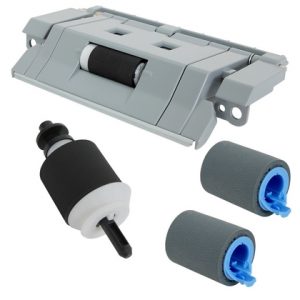
1. HP LaserJet Repair for Recurring Paper Jams
If your HP LaserJet repeatedly jams from Tray 2 or the top feeder, check these three items first:
- Inspect the Paper Stack: Fan the paper before loading to stop static cling. Slide the paper guides snugly against the stack without bending the sheets.
- Check for Torn Scraps: Open the rear door and toner area. Remove any small torn pieces of paper caught near the rollers.
- Worn Pickup & Separation Rollers: Smooth, glossy rollers can no longer grip paper reliably. Installing a new pickup roller kit restores smooth paper feeding.
2. Fixing HP Fuser Errors (50.1, 50.2, 50.3, and 50.4)
A 50.x Fuser Error means the fuser unit is not reaching proper operating temperature. This component uses heat and pressure to bond toner onto every page.
- Try a Quick Reset: Turn the printer off and unplug it directly from the wall. Wait 60 seconds, then plug it back in without a surge protector.
- When Replacement Is Needed: If the 50.x error returns right away, the heating element has likely failed. You will need professional HP LaserJet repair to replace the fuser assembly.
3. Troubleshooting Toner Streaks, Smudges, or Ghosting
Vertical black lines, repeating dots, or faint ghost images usually come from one of three parts:
- Toner Cartridge Drum: Swap in a genuine HP toner cartridge to rule out a scratched imaging drum.
- Transfer Belt or Transfer Roller: Streaks across multiple cartridges often mean a worn transfer belt or roller.
- Fuser Film Sleeve: A torn fuser sleeve commonly leaves vertical smudges along the edge of every page.
If a new toner cartridge does not clear the lines, schedule on-site HP LaserJet repair right away. A technician can inspect your transfer belt and fuser sleeve on the spot.
